TL;DR: What You Need to Know Right Now
Most battery advice you’ve heard is wrong. You don’t need to drain your phone to 0% before charging (this actually damages modern batteries). Overnight charging won’t destroy your battery—smart devices stop charging at 100%. Closing background apps wastes more battery than it saves. The freezer ruins batteries, not preserves them.
What actually works: Keep your battery between 20-80% when possible. Heat is the real enemy—avoid hot cars and charging in direct sunlight. Fast charging is safe. Third-party chargers are fine if certified. Modern batteries last 500-1000 full cycles before significant degradation.
The biggest myth of all? That you need to obsess over battery care. Follow a few simple rules, ignore the rest, and your battery will last years.
Introduction: Why Battery Myths Persist (And Why 2026 Changes Things)
Battery myths spread faster than battery technology evolves. Advice that worked for nickel-cadmium batteries in 1995 gets recycled for lithium-ion batteries in 2026, even though the chemistry is completely different.
Here’s what changed: Modern lithium-ion batteries use sophisticated battery management systems (BMS) that handle charging automatically. Your 2026 smartphone knows more about optimal charging than any internet forum post from 2015.
But outdated advice persists because it sounds technical enough to be credible. “Drain to zero before charging” feels like maintenance. “Never charge overnight” sounds cautious and responsible.
This article separates fact from fiction using current battery science—not recycled advice from the flip phone era.
Part 1: Charging Myths Debunked
Myth #1: You Should Let Your Battery Drain to 0% Before Charging
The Truth: This advice is actively harmful to modern lithium-ion batteries.
Deep discharge cycles—draining your battery to 0% before recharging—stress lithium-ion chemistry. Each deep discharge causes more wear than several partial charges combined.
This myth comes from nickel-cadmium (NiCd) batteries, which suffered from “memory effect.” If you repeatedly charged a NiCd battery from 50%, it would “forget” the bottom 50% existed and act like a half-capacity battery. The solution was periodic full discharge cycles.
Lithium-ion batteries don’t have memory effect. They prefer shallow discharge cycles.
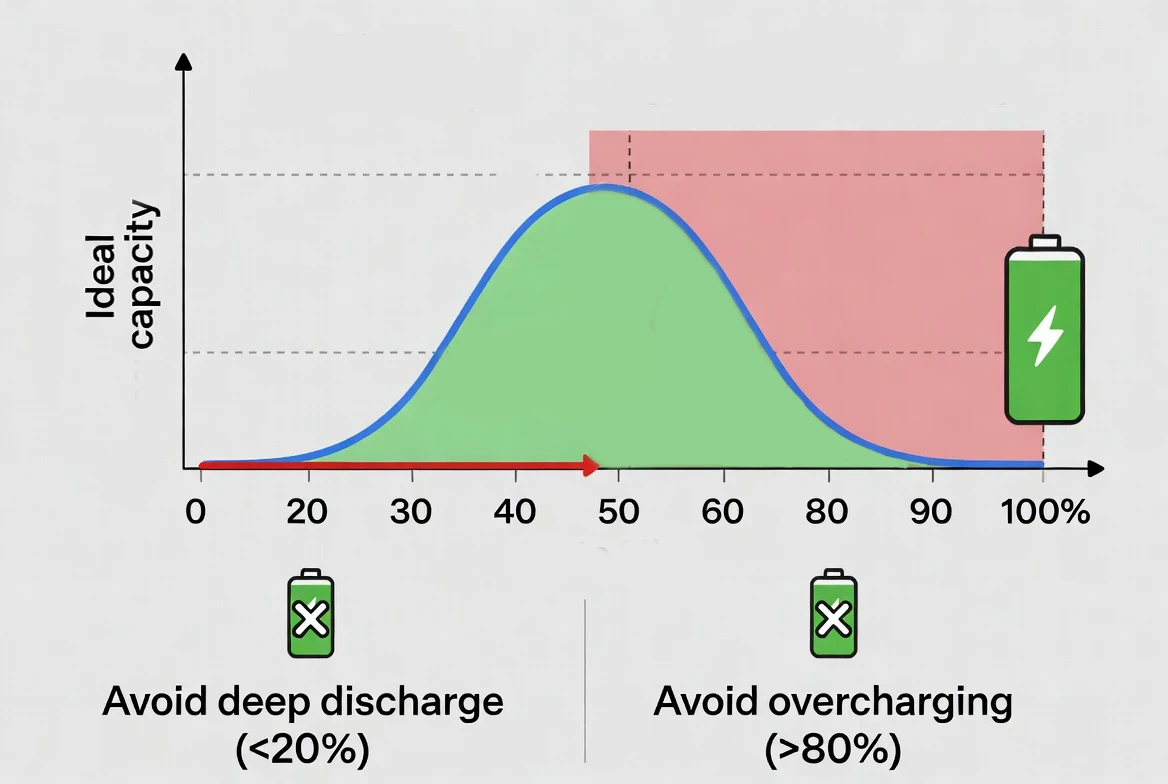
The optimal range: Keep your battery between 20-80% for maximum longevity. Your battery will last significantly longer with partial charges than with full 0-100% cycles.
Myth #2: Charging Your Phone Overnight Destroys the Battery
The Truth: Modern devices prevent overcharging through smart charging technology.
When your battery reaches 100%, the charging circuit automatically stops supplying power. Your phone doesn’t “keep charging” all night—it switches to trickle charging, which maintains 100% without overloading the cells.
Better yet, iOS 18’s Optimized Battery Charging and Android 15’s Adaptive Charging learn your schedule and deliberately slow charging overnight. Your phone might charge to 80% quickly, then wait until shortly before your alarm to top up the final 20%. This reduces time spent at high charge states, which extends battery lifespan.
The real concern: Heat generated during overnight charging, especially if your phone is under a pillow or in a case. Charge on a hard, cool surface instead.
Myth #3: You Must Use Only Official Chargers
The Truth: Quality third-party chargers are perfectly safe—if they’re properly certified.
Official chargers work well, but they’re not magical. The key is certification:
| Certification | Description |
|---|---|
| USB-IF | Ensures USB-C cables meet safety standards |
| UL Listing | Independent safety testing |
| CE Marking | European safety compliance |
A $15 Anker or Belkin charger with these certifications is as safe as a $30 Apple or Samsung charger. Both deliver regulated power that your phone’s battery management system controls.
When official chargers matter: For fast charging protocols. Proprietary fast charging (like OnePlus’s SuperVOOC) requires official or licensed chargers to hit maximum speeds. You’ll still charge safely with third-party options—just slower.
Red flags: Avoid ultra-cheap ($3) chargers from unknown brands. These may lack proper voltage regulation and safety features.
Myth #4: Fast Charging Always Damages Your Battery
The Truth: Modern fast charging is engineered with thermal safeguards.
Fast charging does generate more heat than standard charging, and heat degrades batteries. But 2026 devices manage this through:
- Temperature sensors that slow charging if the battery gets too hot
- Two-stage charging that uses fast charging to 80%, then slows for the final 20%
- Advanced thermal management with heat pipes and graphene layers
Lab tests show minimal difference in battery degradation between fast and standard charging when thermal management works properly.
When to avoid fast charging: If your phone is already hot (from gaming or direct sunlight), standard charging is better. The combined heat load can exceed safe thresholds.
Part 2: Usage Myths Debunked
Myth #5: Closing Background Apps Saves Significant Battery Life
The Truth: Force-closing apps often wastes more battery than leaving them open.
Modern operating systems freeze background apps in low-power states. An app sitting in your recent apps list consumes almost no power—it’s essentially paused in RAM.
When you force-close an app, you’re removing it from RAM. The next time you open it, the system must reload everything from storage, which requires significant CPU and battery power.
What actually drains battery:
- Active background processes (music streaming, navigation, downloads)
- Location services running constantly
- Push notifications from dozens of apps
- Screen brightness set too high
Let your OS manage memory. It’s designed for this.
Myth #6: Turning Off Wi-Fi and Bluetooth Makes a Big Difference
The Truth: Minimal impact with modern low-energy protocols.
Bluetooth Low Energy (BLE) and Wi-Fi 6/7 use negligible power when idle. Your phone might consume 1-2% extra battery per day with both enabled and no active connections.
The counterintuitive part: Leaving Wi-Fi on often saves battery. When Wi-Fi is disabled, your phone uses cellular data, which consumes more power—especially in areas with weak signal.
Myth #7: Airplane Mode Charges Your Phone Faster
The Truth: Marginally true but practically irrelevant.
Airplane mode disables all radios, reducing power consumption during charging. You might charge 5-10% faster.
But you lose all connectivity. No calls, messages, or notifications. For most people, the tradeoff isn’t worth a few minutes of faster charging.
Part 3: Storage and Temperature Myths
Myth #8: Store Batteries in the Freezer to Preserve Them
The Truth: Cold storage can permanently damage modern lithium-ion batteries.
This myth has roots in old alkaline battery advice, where cool (not freezing) storage slightly extended shelf life. It never applied to lithium-ion chemistry.
The problems with freezer storage:
- Condensation: Removing a cold battery into room temperature creates moisture, which can corrode contacts or seep into electronics
- Electrolyte damage: Extreme cold can cause lithium-ion electrolyte to crystallize
- Irreversible capacity loss: Cold damage may permanently reduce battery capacity
Optimal storage conditions:
- Room temperature (20-25°C / 68-77°F)
- 40-60% charge state (not full, not empty)
- Dry environment away from direct sunlight
Myth #9: Batteries Perform the Same in All Temperatures
The Fact: Temperature dramatically affects battery performance and lifespan.
Lithium-ion batteries have an optimal operating range of 20-25°C (68-77°F). Outside this range, performance degrades:
In cold weather (below 0°C / 32°F):
- Chemical reactions slow down
- Available capacity drops (your 100% battery might deliver only 60% capacity)
- Charging becomes less efficient and may stop entirely for safety
In hot weather (above 35°C / 95°F):
- Accelerated chemical degradation
- Permanent capacity loss
- Increased risk of thermal runaway in extreme cases
Part 4: Lifespan and Maintenance Myths
Myth #10: You Need to Calibrate Your Battery Monthly
The Truth: Modern devices auto-calibrate continuously.
Battery calibration means helping your device accurately estimate remaining charge. Older devices occasionally needed manual calibration through a full 0-100% cycle.
2026 smartphones use sophisticated algorithms that constantly calibrate during normal use. The battery management system learns your battery’s actual capacity and adjusts estimates automatically.
Myth #11: Battery Health Degrades Uniformly Over Time
The Fact: Usage patterns matter far more than age.
Two identical phones purchased the same day can have vastly different battery health after one year:
Phone A (careful usage):
- Mostly charged between 20-80%
- Avoided extreme temperatures
- Used moderate charging speeds
- Battery health: 92% after one year
Phone B (harsh usage):
- Frequent 0-100% cycles
- Regular fast charging while gaming
- Often left in hot car
- Battery health: 78% after one year
Myth #12: Replacing Your Battery Is Always Worth It
The Fact: Economics matter as much as environmental considerations.
Battery replacement makes sense when:
- Device is otherwise functional and meets your needs
- Replacement cost is under 30% of device value
- You plan to keep the device 12+ more months
- Software support continues for your device
Part 5: Confirmed Facts About Modern Batteries (2026 Edition)
Fact #1: The 20-80% Rule Is Real (For Longevity)
This isn’t a myth—it’s proven battery science. Lithium-ion batteries experience less stress at partial charge states. High charge states (90-100%) and low charge states (0-10%) accelerate chemical degradation.
Fact #2: Heat Is Your Battery’s Biggest Enemy
Temperature affects battery longevity more than any other factor. Sustained heat above 30°C (86°F) accelerates degradation. Every 10°C increase roughly doubles the rate of capacity loss.
Fact #3: Wireless Charging Generates More Heat
Wireless charging is convenient but thermally inefficient. Energy transfer through induction creates heat—roughly 20-30% of the input power becomes waste heat. Wired charging is 90%+ efficient.
Fact #4: Battery Technology Has Improved Dramatically
2026 batteries aren’t just bigger—they’re fundamentally better. Recent improvements include Silicon-carbon anodes (20-30% higher energy density) and Solid-state electrolytes beginning to appear in premium devices.
2026 Battery Best Practices: The Definitive Guide
For Smartphones
- Optimal routine: Enable 80% charge limit if keeping for 2+ years.
- Settings to enable: Optimized/Adaptive battery charging.
- Settings to disable: Background app refresh for apps you rarely use.
For Laptops
Most 2026 laptops include manufacturer utilities for health management:
| |
The Bottom Line: What Actually Matters in 2026
Top 3 Things That Genuinely Extend Battery Life
- Manage heat religiously. Avoid hot environments and gaming while plugged in.
- Stay between 20-80% when convenient. Enable charge limiting features.
- Use official or certified chargers. Quality power delivery matters.
Top 3 Myths to Stop Worrying About
- Overnight charging. Your phone is smart; just keep it on a cool surface.
- Closing background apps. Let the OS manage your RAM.
- Exact charging percentages. Don’t micromanage your life around a battery.
Frequently Asked Questions
Does leaving my phone on the charger after 100% damage it? No. Modern devices stop actively charging at 100% and switch to trickle charging.
Should I charge to 100% before a long trip? Yes, absolutely. One full charge won’t damage your battery—it’s the pattern of constant full charges that causes extra wear.
Do battery saver apps actually work? Most are unnecessary. Your OS’s built-in battery saver mode is significantly more effective.
Conclusion: Smart Battery Care for Modern Devices
Battery technology in 2026 is remarkably sophisticated. Your devices already do most of the optimization work through battery management systems that prevent overcharging, manage thermal loads, and adapt charging patterns to your usage.
Follow the fundamentals, enable your device’s built-in battery health features, and your battery will easily last 3-4 years of normal use. The real myth? That batteries are fragile and require constant attention. They’re engineered for years of abuse. Treat them reasonably well, and they’ll outlast your desire to upgrade.